---
title: Branded Canvas Ad Slot
description: Branded Canvas ad slot offers a unique advertising experience with customizable creative elements for web and mobile devices.
---
[Skip to content](https://helpdesk.target-video.com/hc/en-us/articles/14321103153554-branded-canvas-ad-slot#main-content)
[More support](https://helpdesk.target-video.com/kb-tickets/new?hsLang=en)
[](https://target-video.com/)
Open main navigation
Close main navigation
- [More support](https://helpdesk.target-video.com/kb-tickets/new)
How can we help you?
- There are no suggestions because the search field is empty.
1. [TargetVideo Knowledge Base](https://helpdesk.target-video.com/?hsLang=en)
2. [Monetization](https://helpdesk.target-video.com/monetization?hsLang=en)
3. [Ad Schedules](https://helpdesk.target-video.com/monetization?hsLang=en#ad-schedules)
# Branded Canvas Ad Slot
## Branded Canvas ad slot offers a unique advertising experience with customizable creative elements for web and mobile devices.
Our Branded Canvas ad slot is an innovative and unique way to monetize your content, offering a fresh approach to advertising in the web and mobile space.
Inspired by the advertising methods used in the CTV/OTT (Connected TV/Over-The-Top) industry, we've adapted this approach for the modern web and mobile devices, resulting in our Branded Canvas ad slot. It enables you to replicate the TV advertising experience on contemporary devices.
In its essence, a Branded Canvas unit is a non-linear ad slot that resizes the player display area for a video to give way for an ad creative that appears in the bottom and left part of the player.
**Unit dimensions and appearance**
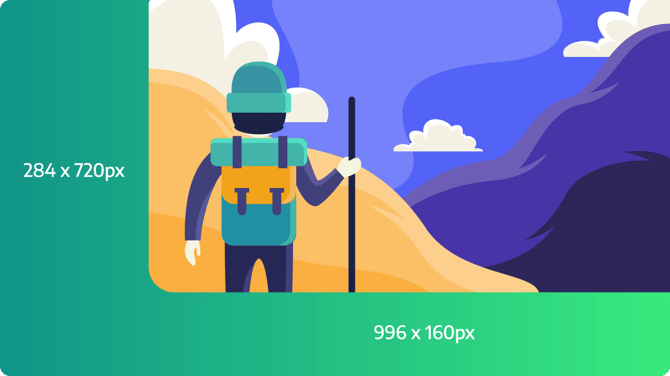

As illustrated, the player anticipates a creative in this specific size. When trafficking your ad, create a 1280x720 creative in your preferred ad server, following the format shown above. Ensure that all your branding and messages are contained within the designated "gray" area, as depicted in the screenshot.
Export your tag from your chosen ad server and insert it as an ad tag within the "Branded Canvas" ad slot at the player level.
*Read more on:* [How to traffic Branded Canvas Ad Unit.](https://helpdesk.target-video.com/hc/en-us/articles/4524252967826-how-to-traffic-a-branded-canvas-ad-unit?hsLang=en)
**Additional notes:**
- Ensure that your ad creative adheres to our specified size standards. Different unit sizes may result in unexpected behavior. All visible assets of your creative should be within the designated areas.
- This ad slot functions as a non-linear advertisement. Configure a start time (cue point(s)) and the duration of the advertisement. Avoid overlapping calls when setting up this configuration.
- Due to the nature of this ad slot, waterfalling multiple branded canvas ad tags is not supported.
- If your player setup includes linear ad assets (pre-roll, mid-roll, post-roll) for display, the branded canvas slot can work alongside them. Avoid overlapping, such as placing mid-rolls over branded canvas ad slots, for an improved user experience.
- Branded canvas ad slots cannot serve as fallback behavior for standard linear ad slots like mid-rolls.
- Branded canvas ad creatives can incorporate interactive elements, and any standard method for creating display banners will work seamlessly with our branded canvas slot.
- [Video Player](https://helpdesk.target-video.com/video-player?hsLang=en#main-content)
- [Player Templates](https://helpdesk.target-video.com/video-player?hsLang=en#player-templates)
- [General Settings](https://helpdesk.target-video.com/video-player?hsLang=en#general-settings)
- [Amplify Engagement](https://helpdesk.target-video.com/video-player?hsLang=en#amplify-engagement)
- [Sticky Player](https://helpdesk.target-video.com/video-player?hsLang=en#sticky-player)
- [Looks and Skins](https://helpdesk.target-video.com/video-player?hsLang=en#looks-and-skins)
- [Frame](https://helpdesk.target-video.com/video-player?hsLang=en#frame)
- [Share Options](https://helpdesk.target-video.com/video-player?hsLang=en#share-options)
- [Ads](https://helpdesk.target-video.com/video-player?hsLang=en#ads)
- [Plugins](https://helpdesk.target-video.com/video-player?hsLang=en#plugins)
- [Event Callbacks](https://helpdesk.target-video.com/video-player?hsLang=en#event-callbacks)
- [Advanced Player Configuration](https://helpdesk.target-video.com/video-player?hsLang=en#advanced-player-configuration)
- [Outstream Ad Units](https://helpdesk.target-video.com/outstream-ad-units?hsLang=en#main-content)
- [Ad Unit Templates](https://helpdesk.target-video.com/outstream-ad-units?hsLang=en#ad-unit-templates)
- [In-content Ad Unit General Settings](https://helpdesk.target-video.com/outstream-ad-units?hsLang=en#in-content-ad-unit-general-settings)
- [In-content Ad Unit Sticky Feature](https://helpdesk.target-video.com/outstream-ad-units?hsLang=en#in-content-ad-unit-sticky-feature)
- [In-content Ad Unit - Ads](https://helpdesk.target-video.com/outstream-ad-units?hsLang=en#in-content-ad-unit-ads)
- [In-slide Ad Unit General Settings](https://helpdesk.target-video.com/outstream-ad-units?hsLang=en#in-slide-ad-unit-general-settings)
- [In-slide Ad Unit - Ads](https://helpdesk.target-video.com/outstream-ad-units?hsLang=en#in-slide-ad-unit-ads)
- [Event callbacks](https://helpdesk.target-video.com/outstream-ad-units?hsLang=en#event-callbacks)
- [Plugins](https://helpdesk.target-video.com/outstream-ad-units?hsLang=en#plugins)
- [Monetization](https://helpdesk.target-video.com/monetization?hsLang=en#main-content)
- [Ad Sources](https://helpdesk.target-video.com/monetization?hsLang=en#ad-sources)
- [Ad Schedules](https://helpdesk.target-video.com/monetization?hsLang=en#ad-schedules)
- [Content Management](https://helpdesk.target-video.com/content-management?hsLang=en#main-content)
- [Video Management](https://helpdesk.target-video.com/content-management?hsLang=en#video-management)
- [Video Import](https://helpdesk.target-video.com/content-management?hsLang=en#video-import)
- [Playlists Management](https://helpdesk.target-video.com/content-management?hsLang=en#playlists-management)
- [Embedding](https://helpdesk.target-video.com/content-management?hsLang=en#embedding)
- [Livestream](https://helpdesk.target-video.com/content-management?hsLang=en#livestream)
- [OTT Application](https://helpdesk.target-video.com/content-management?hsLang=en#ott-application)
- [Syndication](https://helpdesk.target-video.com/content-management?hsLang=en#syndication)
- [Digital Rights Management](https://helpdesk.target-video.com/content-management?hsLang=en#digital-rights-management)
- [Content Units](https://helpdesk.target-video.com/content-management?hsLang=en#content-units)
- [AI Content Matching](https://helpdesk.target-video.com/content-management?hsLang=en#ai-content-matching)
- [General](https://helpdesk.target-video.com/general?hsLang=en#main-content)
- [Site Administration](https://helpdesk.target-video.com/general?hsLang=en#site-administration)
- [User Administration](https://helpdesk.target-video.com/general?hsLang=en#user-administration)
- [Announcements](https://helpdesk.target-video.com/general?hsLang=en#announcements)
- [FAQs](https://helpdesk.target-video.com/general?hsLang=en#faqs)
- [Billing](https://helpdesk.target-video.com/billing?hsLang=en#main-content)
- [Payment](https://helpdesk.target-video.com/billing?hsLang=en#payment)
- [Bandwidth](https://helpdesk.target-video.com/billing?hsLang=en#bandwidth)
- [Advertising, Reports & Analytics](https://helpdesk.target-video.com/advertising-reports-analytics?hsLang=en#main-content)
- [Ads Playback & Troubleshooting](https://helpdesk.target-video.com/advertising-reports-analytics?hsLang=en#ads-playback-troubleshooting)
- [Reports & Analytics](https://helpdesk.target-video.com/advertising-reports-analytics?hsLang=en#reports-analytics)
- [Pre Bidding](https://helpdesk.target-video.com/advertising-reports-analytics?hsLang=en#pre-bidding)
- [Contextual Ads Targeting](https://helpdesk.target-video.com/advertising-reports-analytics?hsLang=en#contextual-ads-targeting)
- [Premium Demand Program](https://helpdesk.target-video.com/advertising-reports-analytics?hsLang=en#premium-demand-program)
- [Platform Updates](https://helpdesk.target-video.com/platform-updates?hsLang=en#main-content)
- [TargetVideo Platform Release 8.0](https://helpdesk.target-video.com/platform-updates?hsLang=en#targetvideo-platform-release-8-0)
- [TargetVideo WP Plugin](https://helpdesk.target-video.com/targetvideo-wp-plugin?hsLang=en)
- [FAQs](https://helpdesk.target-video.com/faqs?hsLang=en)
[](https://target-video.com)
Koppstrasse 16, 81379, Munich, Germany
Copyright © 2025, TargetVideo GmbH