---
title: Static Playlists
description: TargetVideo Knowledge Base
---
[Skip to content](https://helpdesk.target-video.com/hc/en-us/articles/200294042-working-with-user-created-playlists#main-content)
[More support](https://helpdesk.target-video.com/kb-tickets/new?hsLang=en)
[](https://target-video.com/)
Open main navigation
Close main navigation
- [More support](https://helpdesk.target-video.com/kb-tickets/new)
How can we help you?
- There are no suggestions because the search field is empty.
1. [TargetVideo Knowledge Base](https://helpdesk.target-video.com/?hsLang=en)
2. [Content Management](https://helpdesk.target-video.com/content-management?hsLang=en)
3. [Playlists Management](https://helpdesk.target-video.com/content-management?hsLang=en#playlists-management)
# Static Playlists
Static playlists allow you to manually select specific videos you want to include in the playlist. To get started, navigate to the **PLAYLISTS** section in the main left menu and select **ADD NEW**. Then, choose **Static Playlist** from the available options.

Add a title (this is required before you can continue), and then click on the **ADD CONTENT** button. The following window will pop up.
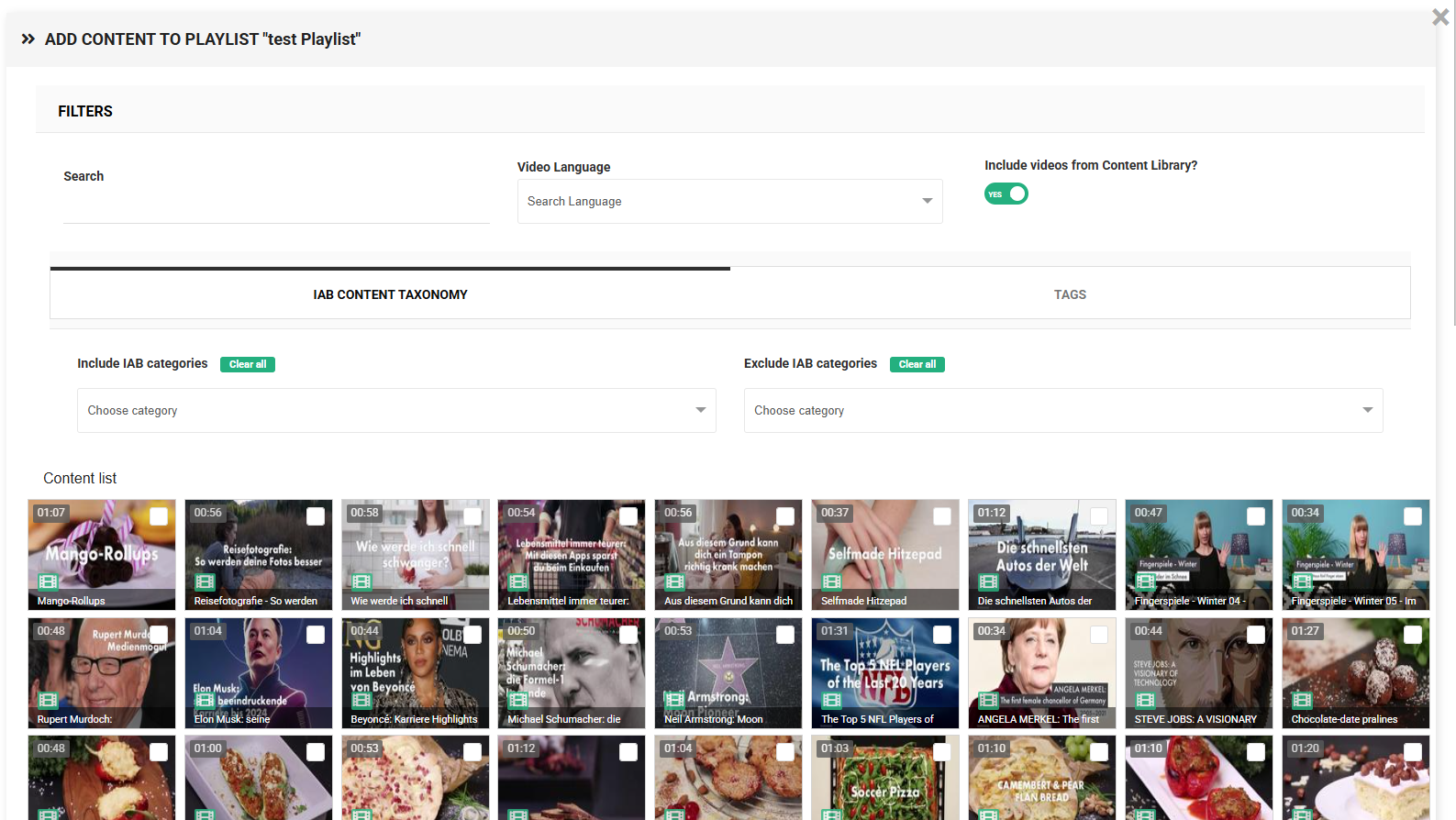
You can filter your videos based on language. Select the desired language from the available options to narrow down the video selection for your static playlist.
You also have the option to choose whether to include videos from the **TargetVideo content library** in the playlist selection. This allows you to further refine the list of videos to choose from.
You can search for videos by tag or IAB category. Choose the appropriate tab depending on whether you want to filter the content using video tags or IAB taxonomy tags. In both options, you can filter by including or excluding specific tags or IAB categories.
Once you find the videos that meet your requirements, select as many as needed and click the **ADD TO PLAYLIST** button.
You can further adjust the playlist either upon creation or at any later point.
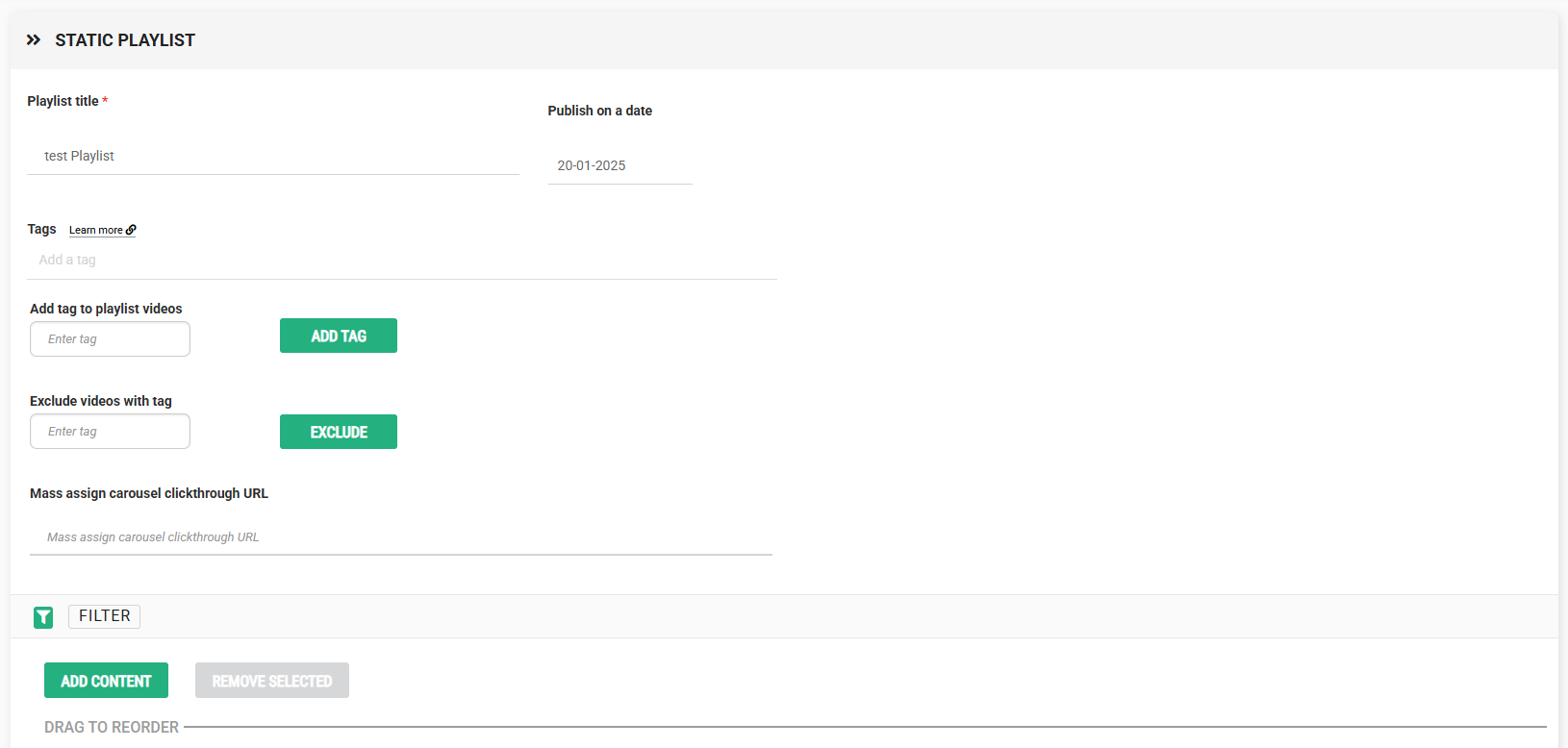
By default, any new playlist you create will not have any tags associated with it. When you **add a tag** to a custom, user-created playlist, any newly added videos with that same tag will automatically be added to that playlist. This gives you an easy way to automatically populate your custom playlists simply by adding a couple of tags at the playlist and video level.
You can also enter a tag you'd like to **exclude**, and videos with that tag will not be included in the playlist.
You have the option to search videos within the current playlist by filtering them by name or tag. You can also add more content to the playlist as needed.
- [Video Player](https://helpdesk.target-video.com/video-player?hsLang=en#main-content)
- [Player Templates](https://helpdesk.target-video.com/video-player?hsLang=en#player-templates)
- [General Settings](https://helpdesk.target-video.com/video-player?hsLang=en#general-settings)
- [Amplify Engagement](https://helpdesk.target-video.com/video-player?hsLang=en#amplify-engagement)
- [Sticky Player](https://helpdesk.target-video.com/video-player?hsLang=en#sticky-player)
- [Looks and Skins](https://helpdesk.target-video.com/video-player?hsLang=en#looks-and-skins)
- [Frame](https://helpdesk.target-video.com/video-player?hsLang=en#frame)
- [Share Options](https://helpdesk.target-video.com/video-player?hsLang=en#share-options)
- [Ads](https://helpdesk.target-video.com/video-player?hsLang=en#ads)
- [Plugins](https://helpdesk.target-video.com/video-player?hsLang=en#plugins)
- [Event Callbacks](https://helpdesk.target-video.com/video-player?hsLang=en#event-callbacks)
- [Advanced Player Configuration](https://helpdesk.target-video.com/video-player?hsLang=en#advanced-player-configuration)
- [Outstream Ad Units](https://helpdesk.target-video.com/outstream-ad-units?hsLang=en#main-content)
- [Ad Unit Templates](https://helpdesk.target-video.com/outstream-ad-units?hsLang=en#ad-unit-templates)
- [In-content Ad Unit General Settings](https://helpdesk.target-video.com/outstream-ad-units?hsLang=en#in-content-ad-unit-general-settings)
- [In-content Ad Unit Sticky Feature](https://helpdesk.target-video.com/outstream-ad-units?hsLang=en#in-content-ad-unit-sticky-feature)
- [In-content Ad Unit - Ads](https://helpdesk.target-video.com/outstream-ad-units?hsLang=en#in-content-ad-unit-ads)
- [In-slide Ad Unit General Settings](https://helpdesk.target-video.com/outstream-ad-units?hsLang=en#in-slide-ad-unit-general-settings)
- [In-slide Ad Unit - Ads](https://helpdesk.target-video.com/outstream-ad-units?hsLang=en#in-slide-ad-unit-ads)
- [Event callbacks](https://helpdesk.target-video.com/outstream-ad-units?hsLang=en#event-callbacks)
- [Plugins](https://helpdesk.target-video.com/outstream-ad-units?hsLang=en#plugins)
- [Monetization](https://helpdesk.target-video.com/monetization?hsLang=en#main-content)
- [Ad Sources](https://helpdesk.target-video.com/monetization?hsLang=en#ad-sources)
- [Ad Schedules](https://helpdesk.target-video.com/monetization?hsLang=en#ad-schedules)
- [Content Management](https://helpdesk.target-video.com/content-management?hsLang=en#main-content)
- [Video Management](https://helpdesk.target-video.com/content-management?hsLang=en#video-management)
- [Video Import](https://helpdesk.target-video.com/content-management?hsLang=en#video-import)
- [Playlists Management](https://helpdesk.target-video.com/content-management?hsLang=en#playlists-management)
- [Embedding](https://helpdesk.target-video.com/content-management?hsLang=en#embedding)
- [Livestream](https://helpdesk.target-video.com/content-management?hsLang=en#livestream)
- [OTT Application](https://helpdesk.target-video.com/content-management?hsLang=en#ott-application)
- [Syndication](https://helpdesk.target-video.com/content-management?hsLang=en#syndication)
- [Digital Rights Management](https://helpdesk.target-video.com/content-management?hsLang=en#digital-rights-management)
- [Content Units](https://helpdesk.target-video.com/content-management?hsLang=en#content-units)
- [AI Content Matching](https://helpdesk.target-video.com/content-management?hsLang=en#ai-content-matching)
- [General](https://helpdesk.target-video.com/general?hsLang=en#main-content)
- [Site Administration](https://helpdesk.target-video.com/general?hsLang=en#site-administration)
- [User Administration](https://helpdesk.target-video.com/general?hsLang=en#user-administration)
- [Announcements](https://helpdesk.target-video.com/general?hsLang=en#announcements)
- [FAQs](https://helpdesk.target-video.com/general?hsLang=en#faqs)
- [Billing](https://helpdesk.target-video.com/billing?hsLang=en#main-content)
- [Payment](https://helpdesk.target-video.com/billing?hsLang=en#payment)
- [Bandwidth](https://helpdesk.target-video.com/billing?hsLang=en#bandwidth)
- [Advertising, Reports & Analytics](https://helpdesk.target-video.com/advertising-reports-analytics?hsLang=en#main-content)
- [Ads Playback & Troubleshooting](https://helpdesk.target-video.com/advertising-reports-analytics?hsLang=en#ads-playback-troubleshooting)
- [Reports & Analytics](https://helpdesk.target-video.com/advertising-reports-analytics?hsLang=en#reports-analytics)
- [Pre Bidding](https://helpdesk.target-video.com/advertising-reports-analytics?hsLang=en#pre-bidding)
- [Contextual Ads Targeting](https://helpdesk.target-video.com/advertising-reports-analytics?hsLang=en#contextual-ads-targeting)
- [Premium Demand Program](https://helpdesk.target-video.com/advertising-reports-analytics?hsLang=en#premium-demand-program)
- [TargetVideo WP Plugin](https://helpdesk.target-video.com/targetvideo-wp-plugin?hsLang=en)
- [Platform Updates](https://helpdesk.target-video.com/platform-updates?hsLang=en#main-content)
- [TargetVideo Platform Release 8.0](https://helpdesk.target-video.com/platform-updates?hsLang=en#targetvideo-platform-release-8-0)
[](https://target-video.com)
Koppstrasse 16, 81379, Munich, Germany
Copyright © 2025, TargetVideo GmbH