---
title: Set Up Intro & Outro Videos
description: TargetVideo Knowledge Base
---
[Skip to content](https://helpdesk.target-video.com/hc/en-us/articles/6938656103442-how-to-set-up-intro-and-outro-videos#main-content)
[More support](https://helpdesk.target-video.com/kb-tickets/new?hsLang=en)
[](https://target-video.com/)
Open main navigation
Close main navigation
- [More support](https://helpdesk.target-video.com/kb-tickets/new)
How can we help you?
- There are no suggestions because the search field is empty.
1. [TargetVideo Knowledge Base](https://helpdesk.target-video.com/?hsLang=en)
2. [Content Management](https://helpdesk.target-video.com/content-management?hsLang=en)
3. [Video Management](https://helpdesk.target-video.com/content-management?hsLang=en#video-management)
# Set Up Intro & Outro Videos
Intros form a strong base to mark the beginning of a video and inform the viewers everything they should know about your brand while giving your content a unique touch to click with the audience. As the name suggests, outros are closing visuals that appear at the end of a video.
They make a well-supported statement for your brand making it better connect to your audience.
Here’s how to enable this feature.
Log into CMS and select your site. Click on the cogwheel button right next to the site's name and navigate to the *Intro/outro section*.
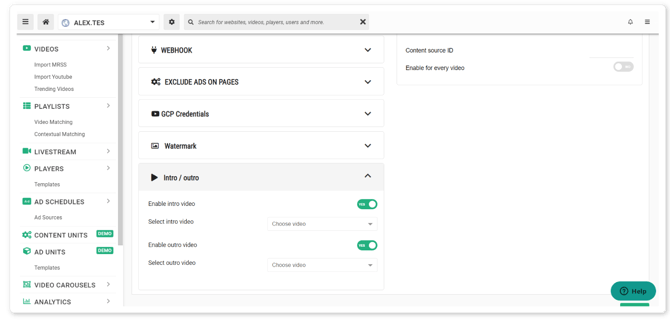
You can separately enable and set intro and outro videos for the selected site. Simply choose a video from the CMS library from the drop-down. Note that there is no option to directly upload the video for this feature. You will need to upload it to CMS prior to setting it as an intro/outro.
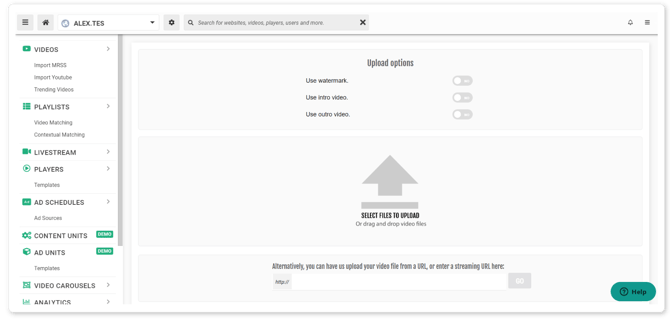
On the video upload page, you will be required to choose whether or not to add an intro or an outro to a specific video. Videos will be merged together and become one whole video.
- [Video Player](https://helpdesk.target-video.com/video-player?hsLang=en#main-content)
- [Player Templates](https://helpdesk.target-video.com/video-player?hsLang=en#player-templates)
- [General Settings](https://helpdesk.target-video.com/video-player?hsLang=en#general-settings)
- [Amplify Engagement](https://helpdesk.target-video.com/video-player?hsLang=en#amplify-engagement)
- [Sticky Player](https://helpdesk.target-video.com/video-player?hsLang=en#sticky-player)
- [Looks and Skins](https://helpdesk.target-video.com/video-player?hsLang=en#looks-and-skins)
- [Frame](https://helpdesk.target-video.com/video-player?hsLang=en#frame)
- [Share Options](https://helpdesk.target-video.com/video-player?hsLang=en#share-options)
- [Ads](https://helpdesk.target-video.com/video-player?hsLang=en#ads)
- [Plugins](https://helpdesk.target-video.com/video-player?hsLang=en#plugins)
- [Event Callbacks](https://helpdesk.target-video.com/video-player?hsLang=en#event-callbacks)
- [Advanced Player Configuration](https://helpdesk.target-video.com/video-player?hsLang=en#advanced-player-configuration)
- [Outstream Ad Units](https://helpdesk.target-video.com/outstream-ad-units?hsLang=en#main-content)
- [Ad Unit Templates](https://helpdesk.target-video.com/outstream-ad-units?hsLang=en#ad-unit-templates)
- [In-content Ad Unit General Settings](https://helpdesk.target-video.com/outstream-ad-units?hsLang=en#in-content-ad-unit-general-settings)
- [In-content Ad Unit Sticky Feature](https://helpdesk.target-video.com/outstream-ad-units?hsLang=en#in-content-ad-unit-sticky-feature)
- [In-content Ad Unit - Ads](https://helpdesk.target-video.com/outstream-ad-units?hsLang=en#in-content-ad-unit-ads)
- [In-slide Ad Unit General Settings](https://helpdesk.target-video.com/outstream-ad-units?hsLang=en#in-slide-ad-unit-general-settings)
- [In-slide Ad Unit - Ads](https://helpdesk.target-video.com/outstream-ad-units?hsLang=en#in-slide-ad-unit-ads)
- [Event callbacks](https://helpdesk.target-video.com/outstream-ad-units?hsLang=en#event-callbacks)
- [Plugins](https://helpdesk.target-video.com/outstream-ad-units?hsLang=en#plugins)
- [Monetization](https://helpdesk.target-video.com/monetization?hsLang=en#main-content)
- [Ad Sources](https://helpdesk.target-video.com/monetization?hsLang=en#ad-sources)
- [Ad Schedules](https://helpdesk.target-video.com/monetization?hsLang=en#ad-schedules)
- [Content Management](https://helpdesk.target-video.com/content-management?hsLang=en#main-content)
- [Video Management](https://helpdesk.target-video.com/content-management?hsLang=en#video-management)
- [Video Import](https://helpdesk.target-video.com/content-management?hsLang=en#video-import)
- [Playlists Management](https://helpdesk.target-video.com/content-management?hsLang=en#playlists-management)
- [Embedding](https://helpdesk.target-video.com/content-management?hsLang=en#embedding)
- [Livestream](https://helpdesk.target-video.com/content-management?hsLang=en#livestream)
- [OTT Application](https://helpdesk.target-video.com/content-management?hsLang=en#ott-application)
- [Syndication](https://helpdesk.target-video.com/content-management?hsLang=en#syndication)
- [Digital Rights Management](https://helpdesk.target-video.com/content-management?hsLang=en#digital-rights-management)
- [Content Units](https://helpdesk.target-video.com/content-management?hsLang=en#content-units)
- [Content Matching](https://helpdesk.target-video.com/content-management?hsLang=en#content-matching)
- [General](https://helpdesk.target-video.com/general?hsLang=en#main-content)
- [Site Administration](https://helpdesk.target-video.com/general?hsLang=en#site-administration)
- [User Administration](https://helpdesk.target-video.com/general?hsLang=en#user-administration)
- [Announcements](https://helpdesk.target-video.com/general?hsLang=en#announcements)
- [FAQs](https://helpdesk.target-video.com/general?hsLang=en#faqs)
- [Billing](https://helpdesk.target-video.com/billing?hsLang=en#main-content)
- [Payment](https://helpdesk.target-video.com/billing?hsLang=en#payment)
- [Bandwidth](https://helpdesk.target-video.com/billing?hsLang=en#bandwidth)
- [Advertising, Reports & Analytics](https://helpdesk.target-video.com/advertising-reports-analytics?hsLang=en#main-content)
- [Ads Playback & Troubleshooting](https://helpdesk.target-video.com/advertising-reports-analytics?hsLang=en#ads-playback-troubleshooting)
- [Reports & Analytics](https://helpdesk.target-video.com/advertising-reports-analytics?hsLang=en#reports-analytics)
- [Pre Bidding](https://helpdesk.target-video.com/advertising-reports-analytics?hsLang=en#pre-bidding)
- [Contextual Ads Targeting](https://helpdesk.target-video.com/advertising-reports-analytics?hsLang=en#contextual-ads-targeting)
- [Premium Demand Program](https://helpdesk.target-video.com/advertising-reports-analytics?hsLang=en#premium-demand-program)
- [Platform Updates](https://helpdesk.target-video.com/platform-updates?hsLang=en#main-content)
- [TargetVideo Platform Release 8.0](https://helpdesk.target-video.com/platform-updates?hsLang=en#targetvideo-platform-release-8-0)
- [TargetVideo WP Plugin](https://helpdesk.target-video.com/targetvideo-wp-plugin?hsLang=en)
- [FAQs](https://helpdesk.target-video.com/faqs?hsLang=en)
[](https://target-video.com)
Koppstrasse 16, 81379, Munich, Germany
Copyright © 2025, TargetVideo GmbH