
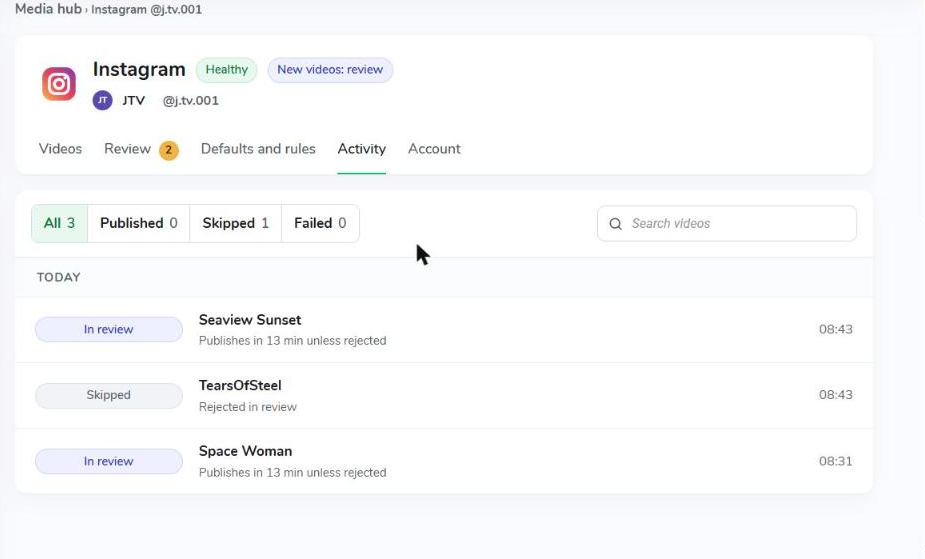
The Activity tab is the full history of one account, grouped by day, newest first. Each row shows the result, the video, how or why, and the time.
- Published · Published automatically, or Published manually or approved in review · View post
- Skipped · the reason, for example Rejected in review, Turned off for this video, Too long, Not a vertical video, Imported from YouTube
- In review · Stays here until you decide, or when it will be posted
- Failed · what went wrong
Filter with All, Published, Skipped and Failed; each shows its count. Use the search box to find one video. A video deleted from the CMS keeps its history and is marked Deleted.
 What Does the Account Tab Show?
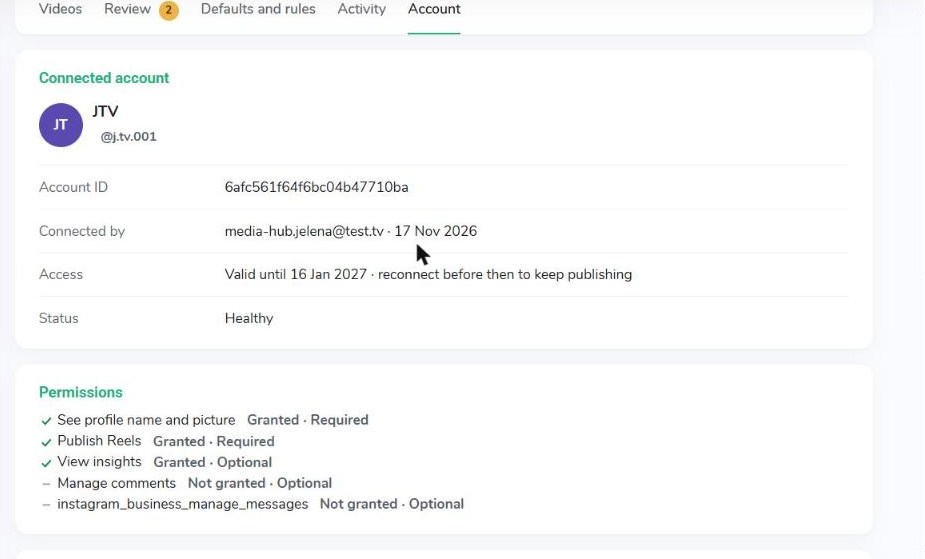
The Account tab shows who connected the account, whether its access is valid, and what the CMS may do on the platform.
 How to Reconnect an Account
Reconnect when access is about to expire (Instagram), when the account shows a problem instead of Healthy, or when you want to grant optional permissions.
- Open the account in Media Hub and go to the Account tab.
- Click Reconnect.
- Sign in again as the same account and approve access.
Settings and history stay as they are.
What Happens When I Disconnect an Account?
- All publishing to the account stops, and charges stop from that day.
- Posts already published stay on the platform.
- Your other accounts are not affected.
- You can reconnect the same account at any time. Its settings go back to the defaults, and its history is kept only if you reconnect within one hour.