---
title: Video and Player Events
description: Video and Player Events
---
[Skip to content](https://helpdesk.target-video.com/video-and-player-events#main-content)
[More support](https://helpdesk.target-video.com/kb-tickets/new?hsLang=en)
[](https://target-video.com/)
Open main navigation
Close main navigation
- [More support](https://helpdesk.target-video.com/kb-tickets/new)
How can we help you?
- There are no suggestions because the search field is empty.
1. [TargetVideo Knowledge Base](https://helpdesk.target-video.com/?hsLang=en)
2. [Advertising, Reports & Analytics](https://helpdesk.target-video.com/advertising-reports-analytics?hsLang=en)
3. [Reports & Analytics](https://helpdesk.target-video.com/advertising-reports-analytics?hsLang=en#reports-analytics)
# Video and Player Events
## This article explains all metrics available in the analytics dashboard, including their definitions, calculation methods, and usage details.
**VIDEO EVENTS
Overview**
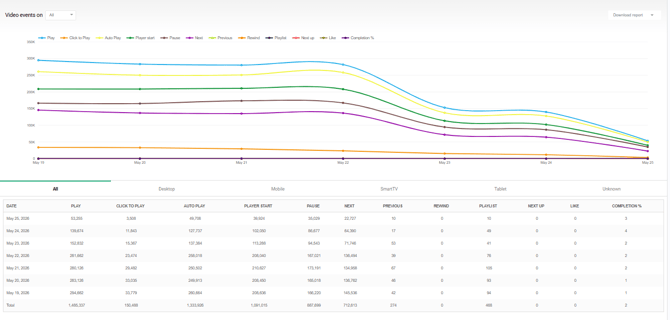**Play:** Tracks every instance when video playback starts, regardless of whether playback was initiated manually by the user or automatically through autoplay.
**Click to Play:** Counts the number of times users manually start video playback by clicking the play button.
**Auto Play:** Counts the number of times a video starts automatically without user interaction.
**Player Start:** Tracks when the video player is triggered, including preroll playback.
This metric does not require the main video content to begin playing. It is counted as soon as the player starts.
For playlists, the metric is counted only once when the first video starts.
**Pause:** Counts the number of times users pause video playback.
**Next:** Tracks clicks on the Next button within a playlist.
**Previous:** Tracks clicks on the Previous button within a playlist.
**Rewind:** Counts the number of times users rewind a video using the rewind control.
**Playlist:** Counts the number of times users open the playlist view.
**Next Up:** Tracks interactions with the “Next Up” recommendation, including preview views and clicks to play.
**Like:** Counts the number of times users like a video.
**Completion%:** It represents the number of videos that were watched until the end in relation to the number of video plays.
**Engagement**
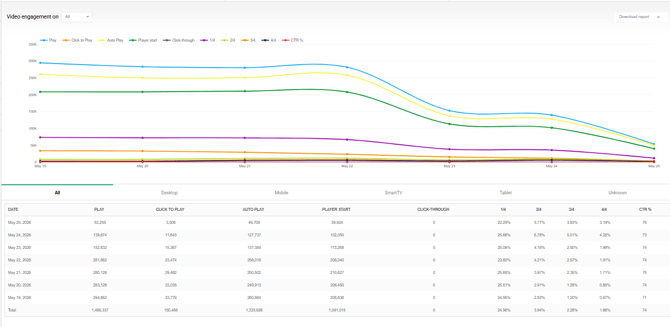**Click-through:** Counts the number of times a user clicks on a call-to-action, link, or interactive element associated with the video.
**1/4 -** Represents the number of users who watched at least 25% of the video.
**2/4 -** Represents the number of users who watched at least 50% of the video.
**3/4 -** Represents the number of users who watched at least 75% of the video.
**4/4 -** Represents the number of users who completed 100% of the video.
**CTR % (Click-Through Rate):** The ratio of users who clicked on the video’s interactive element (click-through) to the total number of video views, expressed as a percentage. Formula: CTR % = (Click-through / Plays) × 100%.
**Operating system**
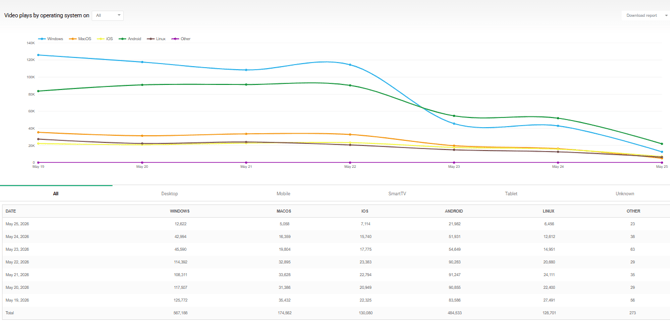
These metrics display video plays grouped by operating system.
Supported operating systems include:
• Windows
• macOS
• iOS
• Android
• Linux
• Other operating systems
**Browser
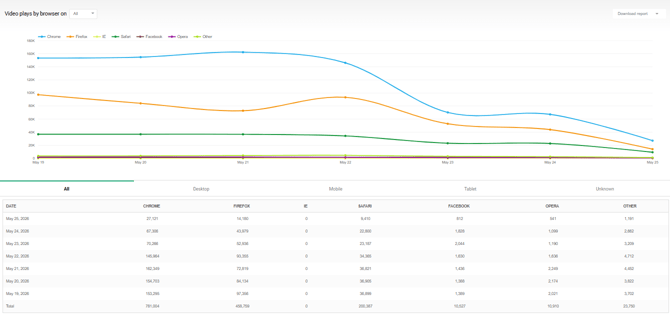**These metrics display video plays grouped by browser. Supported browsers include:
• Chrome
• Firefox
• Internet Explorer (IE)
• Safari
• Facebook In-App Browser
• Opera
• Other browsers
**Social
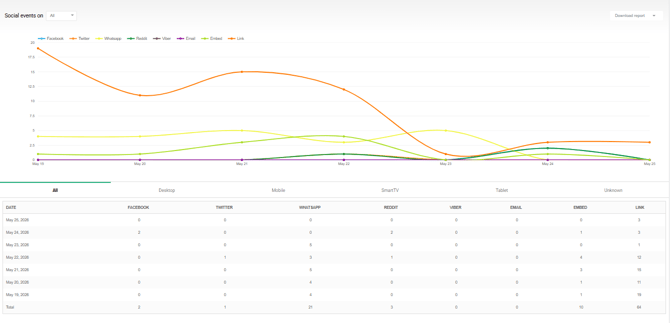**These metrics track how users share content across supported channels. Supported sharing methods include:
• Facebook
• Twitter/X
• WhatsApp
• Reddit
• Viber
• Email
• Copy Embed Code
• Copy Direct Link
**PLAYER EVENTS
Overview
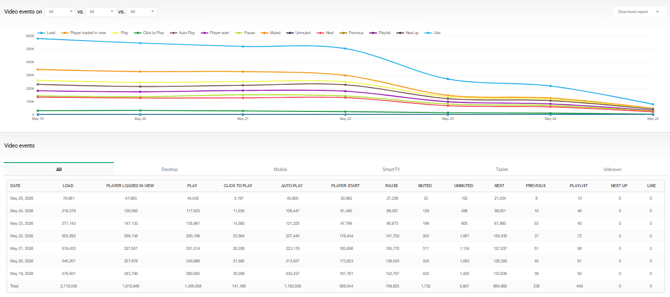Load:** Tracks when the video player code is successfully loaded on the page. This metric measures technical availability regardless of visibility or user interaction.
**Player Loaded in View:** Tracks when the player becomes visible within the user’s viewport. This metric indicates when the player is actually visible to the user.
**Play:** Tracks when video playback starts, regardless of whether playback was user-initiated or autoplayed.
**Click to Play:** Tracks when users manually start playback by clicking the play button.
**Auto Play:** Tracks when playback starts automatically without user interaction.
**Player Start:** Tracks when the player is triggered, including preroll playback. This metric does not require the main video content to start playing. For playlists, the metric is counted only once when the first video starts.
**Pause:** Tracks every time users pause video playback.
**Muted:** Tracks when users mute the video.
**Unmuted:** Tracks when users unmute the video.
**Next:** Tracks clicks on the **Next** button within a playlist.
**Previous:** Tracks clicks on the **Previous** button within a playlist.
**Playlist:** Tracks when users open the playlist view.
**Next Up:** Tracks when the next suggested video is displayed or selected.
**Like:** Tracks when users click the like button.
**Engagement**
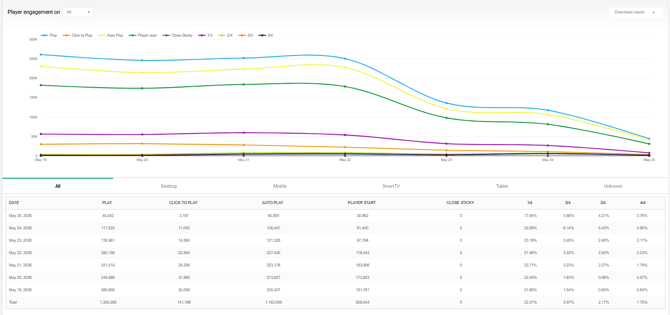**Play:** Tracks when video playback starts, regardless of whether playback was initiated manually or automatically.
**Click to Play:** Tracks when users manually start playback.
**Auto Play:** Tracks when playback starts automatically without user interaction.
**Player Start:** Tracks when the player begins playback, including preroll playback.
**1/4 -** Users who watched at least 25% of the video.
**2/4 -** Users who watched at least 50% of the video.
**3/4 -** Users who watched at least 75% of the video.
**4/4 -** Users who completed 100% of the video.
**Operating system**
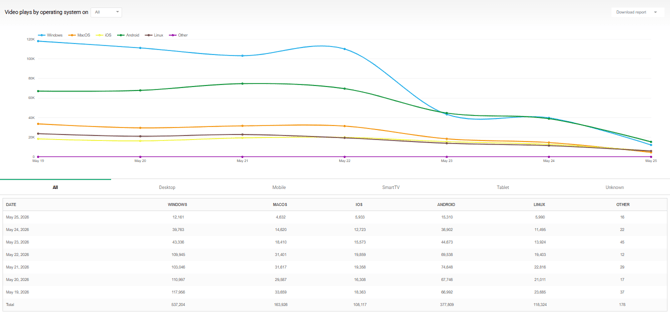
These metrics display video plays grouped by operating system.
Supported operating systems include:
• Windows
• macOS
• iOS
• Android
• Linux
• Other operating systems
**Browser**
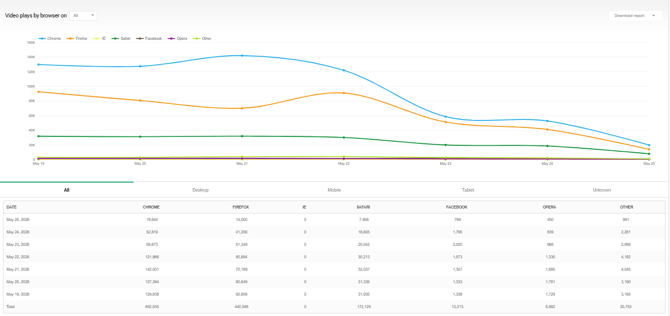
These metrics display video plays grouped by browser. Supported browsers include:
• Chrome
• Firefox
• Internet Explorer (IE)
• Safari
• Facebook In-App Browser
• Opera
• Other browsers
- [Video Player](https://helpdesk.target-video.com/video-player?hsLang=en#main-content)
- [Player Templates](https://helpdesk.target-video.com/video-player?hsLang=en#player-templates)
- [General Settings](https://helpdesk.target-video.com/video-player?hsLang=en#general-settings)
- [Amplify Engagement](https://helpdesk.target-video.com/video-player?hsLang=en#amplify-engagement)
- [Sticky Player](https://helpdesk.target-video.com/video-player?hsLang=en#sticky-player)
- [Looks and Skins](https://helpdesk.target-video.com/video-player?hsLang=en#looks-and-skins)
- [Frame](https://helpdesk.target-video.com/video-player?hsLang=en#frame)
- [Share Options](https://helpdesk.target-video.com/video-player?hsLang=en#share-options)
- [Ads](https://helpdesk.target-video.com/video-player?hsLang=en#ads)
- [Plugins](https://helpdesk.target-video.com/video-player?hsLang=en#plugins)
- [Event Callbacks](https://helpdesk.target-video.com/video-player?hsLang=en#event-callbacks)
- [Advanced Player Configuration](https://helpdesk.target-video.com/video-player?hsLang=en#advanced-player-configuration)
- [Outstream Ad Units](https://helpdesk.target-video.com/outstream-ad-units?hsLang=en#main-content)
- [Ad Unit Templates](https://helpdesk.target-video.com/outstream-ad-units?hsLang=en#ad-unit-templates)
- [In-content Ad Unit General Settings](https://helpdesk.target-video.com/outstream-ad-units?hsLang=en#in-content-ad-unit-general-settings)
- [In-content Ad Unit Sticky Feature](https://helpdesk.target-video.com/outstream-ad-units?hsLang=en#in-content-ad-unit-sticky-feature)
- [In-content Ad Unit - Ads](https://helpdesk.target-video.com/outstream-ad-units?hsLang=en#in-content-ad-unit-ads)
- [In-slide Ad Unit General Settings](https://helpdesk.target-video.com/outstream-ad-units?hsLang=en#in-slide-ad-unit-general-settings)
- [In-slide Ad Unit - Ads](https://helpdesk.target-video.com/outstream-ad-units?hsLang=en#in-slide-ad-unit-ads)
- [Event callbacks](https://helpdesk.target-video.com/outstream-ad-units?hsLang=en#event-callbacks)
- [Plugins](https://helpdesk.target-video.com/outstream-ad-units?hsLang=en#plugins)
- [Monetization](https://helpdesk.target-video.com/monetization?hsLang=en#main-content)
- [Ad Sources](https://helpdesk.target-video.com/monetization?hsLang=en#ad-sources)
- [Ad Schedules](https://helpdesk.target-video.com/monetization?hsLang=en#ad-schedules)
- [Content Management](https://helpdesk.target-video.com/content-management?hsLang=en#main-content)
- [Video Management](https://helpdesk.target-video.com/content-management?hsLang=en#video-management)
- [Video Import](https://helpdesk.target-video.com/content-management?hsLang=en#video-import)
- [Playlists Management](https://helpdesk.target-video.com/content-management?hsLang=en#playlists-management)
- [Embedding](https://helpdesk.target-video.com/content-management?hsLang=en#embedding)
- [Livestream](https://helpdesk.target-video.com/content-management?hsLang=en#livestream)
- [OTT Application](https://helpdesk.target-video.com/content-management?hsLang=en#ott-application)
- [Syndication](https://helpdesk.target-video.com/content-management?hsLang=en#syndication)
- [Digital Rights Management](https://helpdesk.target-video.com/content-management?hsLang=en#digital-rights-management)
- [Content Units](https://helpdesk.target-video.com/content-management?hsLang=en#content-units)
- [AI Content Matching](https://helpdesk.target-video.com/content-management?hsLang=en#ai-content-matching)
- [General](https://helpdesk.target-video.com/general?hsLang=en#main-content)
- [Site Administration](https://helpdesk.target-video.com/general?hsLang=en#site-administration)
- [User Administration](https://helpdesk.target-video.com/general?hsLang=en#user-administration)
- [Announcements](https://helpdesk.target-video.com/general?hsLang=en#announcements)
- [FAQs](https://helpdesk.target-video.com/general?hsLang=en#faqs)
- [Billing](https://helpdesk.target-video.com/billing?hsLang=en#main-content)
- [Payment](https://helpdesk.target-video.com/billing?hsLang=en#payment)
- [Bandwidth](https://helpdesk.target-video.com/billing?hsLang=en#bandwidth)
- [Advertising, Reports & Analytics](https://helpdesk.target-video.com/advertising-reports-analytics?hsLang=en#main-content)
- [Ads Playback & Troubleshooting](https://helpdesk.target-video.com/advertising-reports-analytics?hsLang=en#ads-playback-troubleshooting)
- [Reports & Analytics](https://helpdesk.target-video.com/advertising-reports-analytics?hsLang=en#reports-analytics)
- [Pre Bidding](https://helpdesk.target-video.com/advertising-reports-analytics?hsLang=en#pre-bidding)
- [Contextual Ads Targeting](https://helpdesk.target-video.com/advertising-reports-analytics?hsLang=en#contextual-ads-targeting)
- [Premium Demand Program](https://helpdesk.target-video.com/advertising-reports-analytics?hsLang=en#premium-demand-program)
- [Platform Updates](https://helpdesk.target-video.com/platform-updates?hsLang=en#main-content)
- [TargetVideo Platform Release 8.0](https://helpdesk.target-video.com/platform-updates?hsLang=en#targetvideo-platform-release-8-0)
- [TargetVideo WP Plugin](https://helpdesk.target-video.com/targetvideo-wp-plugin?hsLang=en)
- [FAQs](https://helpdesk.target-video.com/faqs?hsLang=en)
[](https://target-video.com)
Koppstrasse 16, 81379, Munich, Germany
Copyright © 2025, TargetVideo GmbH